
OOS & Planogram AI
Find shelf gaps and placement errors with visual evidence.
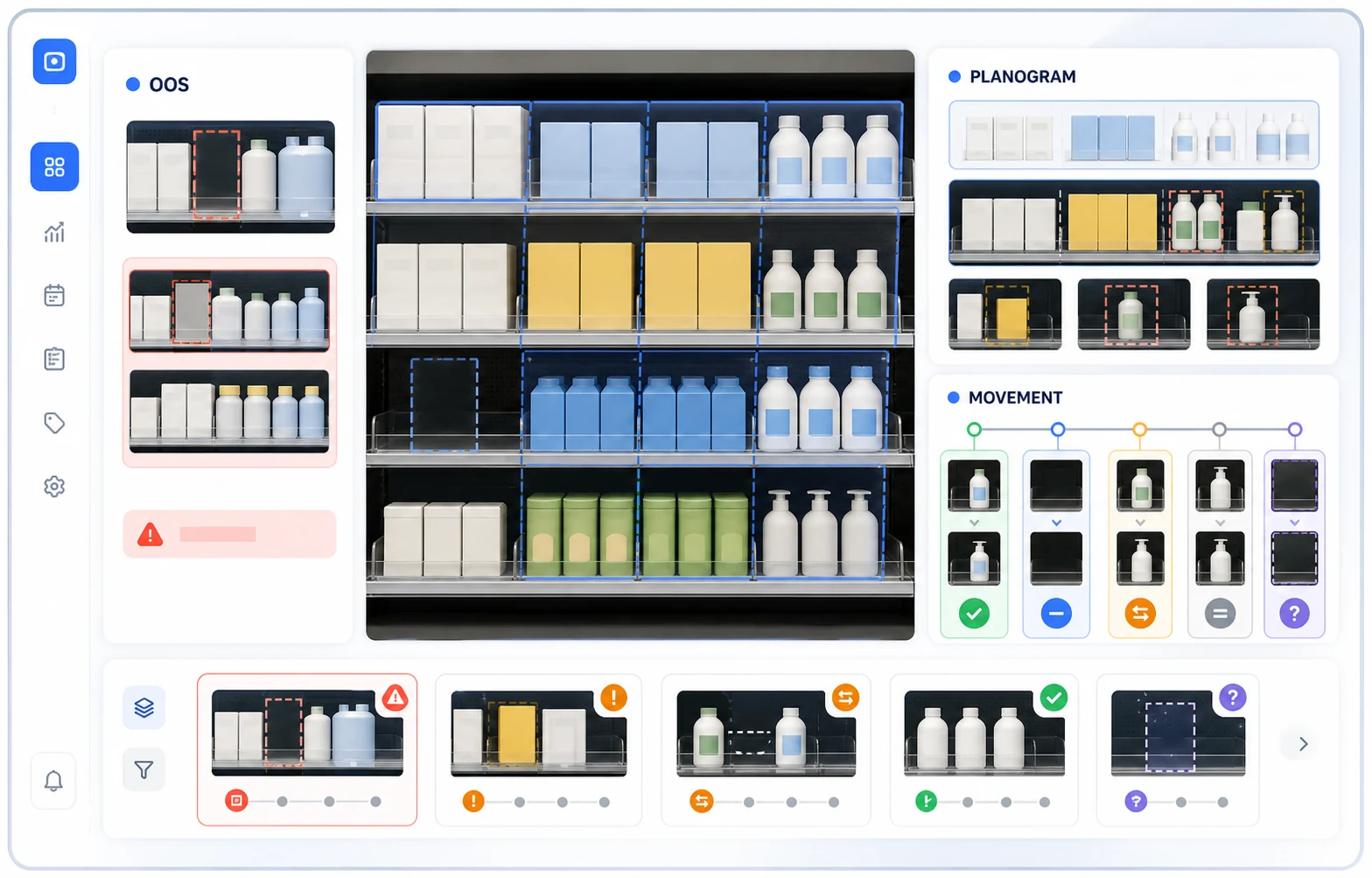
Compare selected shelf images with the reference planogram to find out-of-stock (OOS) observations and misplaced products. Your team reviews the images and prioritizes replenishment and placement checks.
- OOS & replenishment
- Planogram verification
- Product movement
- Depletion & recovery patterns
Choose the shelf checks your team needs
Check OOS detection, planogram comparisons, and product-movement analysis separately against your shelf images and review process.
OOS
OOS detection and replenishment review
Detect low or empty products, alert teams to unfinished replenishment work, and review time-based history for each product.
Planogram
Check placement against planograms
Compare the live shelf with the planned layout to find mismatched products and manage the alert and review workflow.
Product movement
Optimize shelf changes with data
Use ESL integration to support price-label moves and shelf changes without manual barcode scans.
From shelf images to staff review in three steps
Select the shelf issue, check capture conditions, and review the findings before acting.
-
01
Choose the problem and set the baseline
Select the store’s most urgent issue—such as OOS or placement errors—and register the reference shelf state for comparison.
-
02
Check analysis under your store conditions
Review lighting, product visibility, and camera angles. Check the results against shelf images before expanding the scope.
-
03
Review findings and assign the next action
Staff confirm shelf gaps and misplaced products using images, then arrange replenishment or display changes.
On-device analysis of shelf images
On-device Vision and VLM inference turns shelf and slot imagery into SKU observations, OOS states, planogram mismatch candidates, and product-movement results. Evidence images and analysis results follow the transmission, retention, and review rules defined for the selected camera and workflow design.
Models distinguish product and SKU observations within configured shelf, slot, and region-of-interest boundaries.
Each candidate result keeps the observed state and evidence needed for operator review.
Sensitive store imagery is managed securely according to your security policy and is available only to authorized reviewers.
See the evidence behind each shelf action
The demo shows the image, observed state, and review decision behind each OOS, planogram, or movement action.
Shelf and slot images, marked regions of interest (ROI), analysis time, and the resulting state
OOS observations, replenishment work, and available analysis history
Expected product, observed result, and evidence for each planogram mismatch candidate
Movement result, review decision, action status, and confirmed integration boundary
Technical overview
Underlying Vision AI technology
- Environment
- Published technology overview
- Analysis
- Detection, tracking, and test introduction
- Application
- Review sensing principles and validation scope
Use connected shelf data to prioritize reviews
The AI Agent is a separate solution that requires agreed data connections. It analyzes authorized data, summarizes results, exports CSV files, and recommends actions. Your team reviews the recommendations and carries them out.
Questions using connected data
Prioritize the OOS slots that need review and include the supporting evidence.
Group planogram mismatch candidates by observed result and review status.
List product-movement results that still need an operator decision.
Answers use only connected data within your account and workspace permissions. Each answer shows the period, filters, and metrics and distinguishes observations from interpretation.

Frequently asked questions
Can one store use all three capabilities?
Yes. When camera coverage and the installation environment are in place, OOS detection, planogram checks, and product-movement analysis can run together in one store. We assess the site before deployment and recommend the most effective scope.
How quickly can selected products be supported?
We can start with priority product groups. Lighting, packaging, and visibility are checked before expanding coverage to additional products.
How far does workflow automation go?
Today, we focus on automated analysis and review that helps store operators make faster, more accurate decisions. AI identifies OOS and placement errors with supporting evidence, while the operator makes the final confirmation.
Start with the most urgent issue in your store
The demo reviews your camera environment, needed capabilities, and analysis and operator-review workflow.